
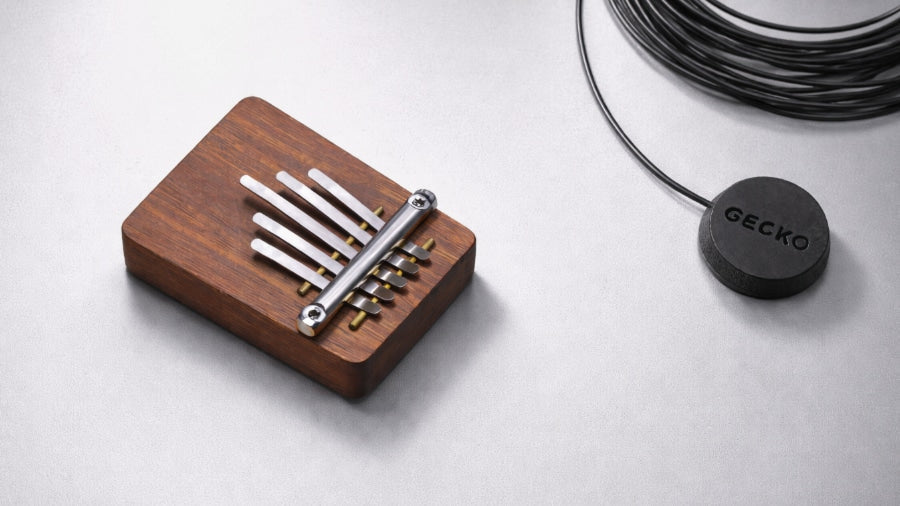
If you're wondering how to use a kalimba pickup, the Gecko pickup is a contact microphone designed to amplify the sound of your kalimba. This guide will show you how to connect the Gecko pickup to your kalimba, allowing you to amplify, record, or connect it to audio devices for a clearer and richer sound.
1. Choosing the Right Pickup

It is essential to choose the right type of pickup that suits both your needs and the kind of Kalimba you have. Gecko contact pickups are designed to be placed directly on the body of the Kalimba, near the sound hole or the tines. They capture the instrument's vibrations, providing a clear and accurate representation of the sound.
Other types of pickup available include clip-on pickups, which are attached to the tines or the body of the Kalimba. They offer versatility in placement and can be easily removed or repositioned as needed. The other type is a magnetic pickup designed to be placed close to the vibrating metal tines of the Kalimba. They use magnetic fields to capture the sound, offering a unique tonal quality. Consider the type of sound you want to achieve and the convenience of placement when selecting the right Gecko pickup for your Kalimba.
2. Positioning the Pickup
noticeably affect tone, clarity, and volume, so it’s important to get this right. For contact pickups, place the pickup on the body of the kalimba near the sound hole or tines. For clip-on pickups, attach it securely to the tines or body to avoid movement or unwanted vibration. You’ll need to experiment with different positions to find what sounds best, as there isn’t one perfect spot. Even slight adjustments can change the sound, so expect some trial and error before you get the result you’re looking for.
3. Securing the Pickup
Once positioned, the pickup needs to be secured firmly to avoid movement that can affect sound quality. Even slight shifts can introduce unwanted noise or inconsistencies. If using adhesive, apply it carefully and press the pickup firmly onto the kalimba, avoiding excess that could damage the surface. If using clips, attach them securely so the pickup stays in place without slipping. A stable connection is essential for clean sound, so take your time to ensure it’s properly fixed before playing or recording.
4. Connecting the Pickup
Once secured, connect the pickup to your audio device. This could be an amplifier, mixer, audio interface, or computer, depending on your setup. Plug the cable into the pickup, then connect the other end to your chosen device’s input. Make sure all connections are secure, as loose cables can cause signal loss or unwanted noise. Once connected, you can amplify or record your kalimba, but the final sound will depend on your setup and settings, not just the pickup itself.
5. Using the Pickup with an Amplifier
One of the primary purposes of using a Gecko pickup is to amplify the sound of your Kalimba. By connecting the pickup to an amplifier, you can enhance the volume and projection of the instrument. To use the Gecko pickup with an amplifier you will need to plug the pickup cable into the input port of your amplifier. Turn on the amplifier and adjust the volume and tone settings as desired. Play your Kalimba and listen to the amplified sound through the amplifier. Experiment with different settings to achieve the desired tone and volume. If the sound quality needs further adjustment, consider using additional effects pedals or equalizers to shape the tone to your preference. Using a Gecko pickup with an amplifier allows you to showcase the unique sound of your Kalimba in a live performance or rehearsal setting.
6. Using the Pickup with a Recording Setup
To record your kalimba, connect the pickup to an audio interface or mixer, then set it as the input in your recording software (DAW). Once recognised, arm a track and start recording while you play. Monitor the sound through headphones or speakers to check quality as you go. While the setup is simple, getting a clean, balanced recording depends on your levels, positioning, and overall setup, not just the pickup itself. With the right adjustments, you can record, edit, and share your kalimba performances—but achieving a polished sound often takes some experimentation.
7. Connecting the Pickup to a Computer
You can connect the pickup directly to a computer using a line-in port or a USB audio interface. Once connected, select it as your input device in your system settings or recording software. Test the signal by playing your kalimba and monitoring the sound through headphones or speakers. You may need to adjust input levels and settings to avoid distortion, noise, or latency. While it’s straightforward to set up, getting clean, responsive audio depends on your equipment and configuration, so some fine-tuning is usually needed.
8. Fine-Tuning the Sound
Once connected, you’ll need to adjust your sound to get the best results. Start by balancing your input levels to avoid distortion or low volume, then experiment with EQ to shape the tone. You can also add effects like reverb or delay to enhance the sound, but small changes can make a big difference. It’s important to listen for unwanted noise or interference and make adjustments where needed. Getting a clean, polished sound takes more than just plugging in, so expect some trial and error as you refine your setup.
9. Caring for Your Pickup
To keep your pickup working properly, store it in a dry place and avoid exposure to moisture. After use, keep it protected from dust and damage. Be careful when applying or removing adhesive to avoid marking your kalimba, and regularly check cables and connections for wear. Keeping everything in good condition helps maintain consistent sound quality over time.
10. Experimenting and Finding Your Sound
Using a pickup opens up a range of tones and effects, but finding the right sound takes experimentation. Small changes in placement, settings, and equipment can noticeably affect the result. Try different positions, setups, and effects to shape your tone, and pay attention to how each adjustment changes the sound. There’s no single “correct” setup, so it often takes time to find what works best for you. Getting a sound you’re truly happy with is a process, and small details can make a big difference.
Get the Best Sound from Your Kalimba

Recording properly takes more than just plugging in a pickup. Inside the course, you’ll see exactly how to set everything up, avoid common playing mistakes, and get the best sound from your instrument. If you want to see exactly how to record your kalimba properly, including how to use a pickup step-by-step, this is covered in detail inside the course.


